Web (Oregon)
bottledrop.com / my
bottledrop.com is the main website for consumers interacting with the BottleDrop system. It is built in Wordpress and maintained internally by C. Todd Davis, with assistance and hosting from Gard. At present, this code is not readily available to OBRC developers.
my.bottledrop.com is a seamless counterpart that powers the forms on bottledrop.com as well as the interactivity behind the customer login. It is an old school pre-SPA .NET 4.7 website with postbacks, hosted internally by OBRC.
Repositories
Architecture
What appears to the public as "bottledrop.com" is deployed as these two separate web applications on two different domains. The split between these two sites is obvious by checking the URL of a page, with a couple of cavaeats, which are described in the rest of this document.
Styling and Javascript Sync
The my site ends up with its header, footer, and general styling by occasionally syncing markup from the Wordpress site (see SyncWithMainSite() in AppHost.cs). That means a basic styling change or navigation item added to the Wordpress site will sync over to my in about 20 minutes. It's a cool trick, but one downside is that certain changes to www might break the my site.
Every page on both sites end up loading all of the my javascript (bundle.js or bundle.min.js) as well as the www javascript (production.min.js). This means that pages on either side end up with roughly the same front-end capabilities.
Is Authenticated
Something in this shared front-end code makes a call to my's /Account/IsAuthenticated.json on each page load to find out if the user is logged in, presumably to show different navigation options (e.g. "Login" vs "Logout").
Embedded Forms
Some pages of the www site embed forms that are actually hosted off of and handled by the my site.
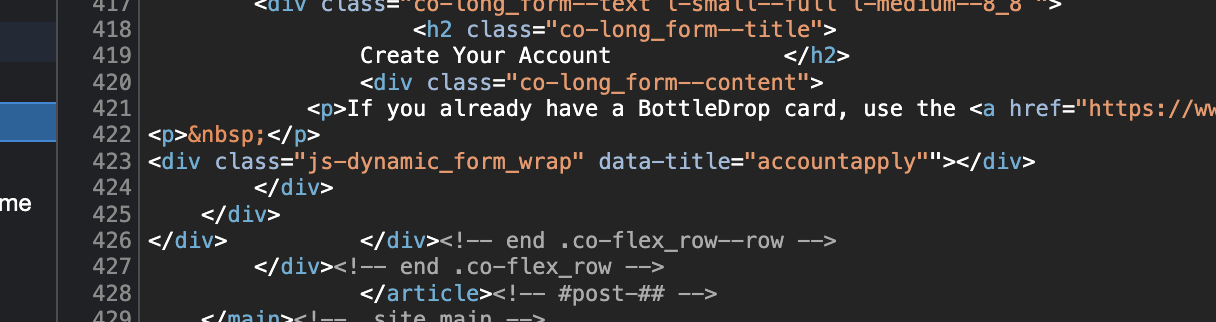
1) Wordpress on www serves up empty HTML elements of specific classes. For example, in this View Source of the Account Creation page, on line 423, the empty .js-dynamic_form_wrap element is where the Account Application form ends up getting embedded.
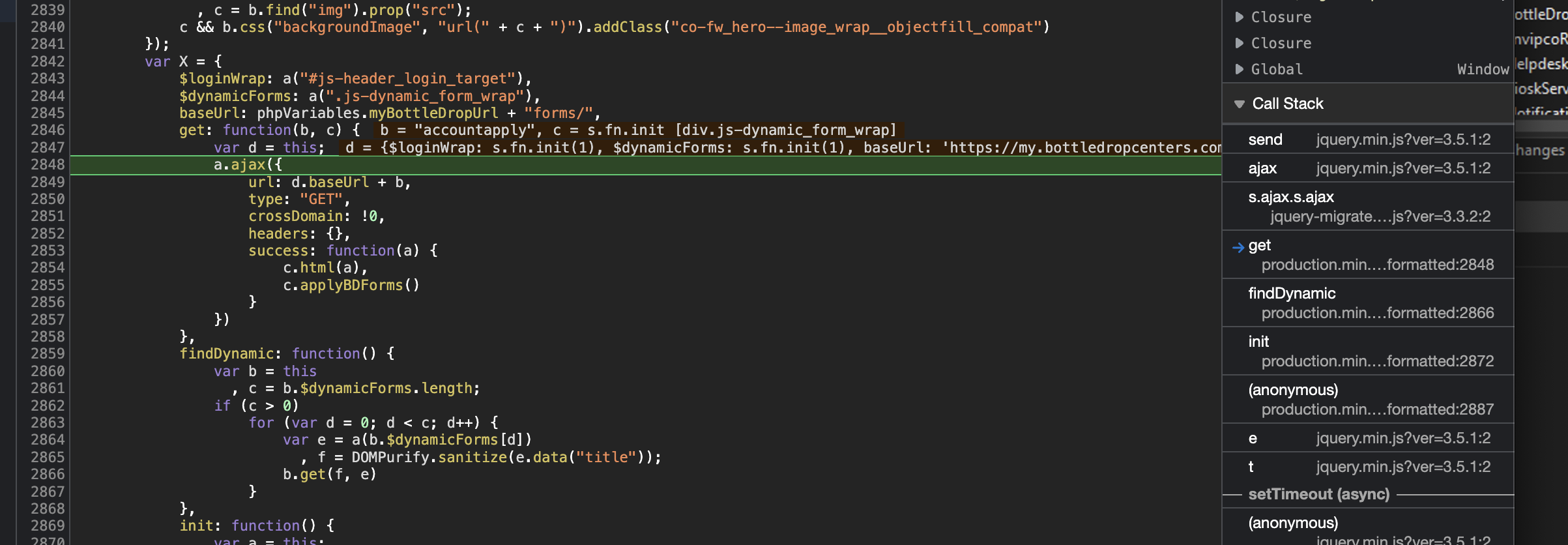
2) The Wordpress theme’s javascript (which I don’t know that we have access to, but specifically the file production.js) looks for the elements of these classes (lines 2843 and 2844 in screen below). When it finds the elements, if they exist on the page, it makes AJAX GET calls (line 2850) to https://my.bottledropcenters.com/forms/[form-data-title-here] which return the raw HTML of just the form. The elements then get filled with this HTML (by the .html() method which is actually part of jQuery, line 2854 below).
3) Then, some special logic gets applied to the loaded HTML form: .applyBDForms(), line 2855. This function is defined in bundle.js, which is the javascript bundle served off of and for the my site.
Here’s the part of the bundle.js code that hijacks the account Application form. The .bootstrapForm() function being applied to the form element is part of the ss-utils ServiceStack library from back in the day. It appears to be converting the post back of the HTML form in question to an AJAX call and handling it in a specific way, accounting for the validation, etc.
$('#form-my-accountapply').bootstrapForm({
    success: function (response) {
        if (!response.internalError) {
            window.location = MY_HOST_URL + '/' + response.returnUrl;
        }
    }
});
Developing Embedded Forms
OK, so how do you work on these things without a development Wordpress instance?
Because of the Styling and Javascript sync described above, you should be able to develop and debug the form in your development my instance first before allowing Wordpress to embed it on one of its pages. Shown below is an example of embedding the form for development on my. This particular example is available as the URL /account/apply in your browser after you launch the site with Visual Studio.
{{ 'forms/accountapply' | partial() }}
You will also want that embedded form's post-back URL to point to your local instance and not my.bottledropcenters.com. In the above sample from bundle.js notice the use of MY_HOST_URL. This gets swapped in by the JavaScript compilation process defined in AppHost.cs. So you need to make sure that MySiteUrl in your AppSettings is set to the correct base URL. (to be confirmed: This might happen automatically in local development).
var myHost = AppSettings.Get("MySiteUrl", "https://my.bottledropcenters.com");
var rootSite = AppSettings.Get("RootSiteUrl", "https://www.bottledropcenters.com");

js = js.Replace("MY_HOST_URL", "'" + myHost + "'");
js = js.Replace("ROOT_SITE_URL", "'" + rootSite + "'");